
Squarespace handles Australian shipping with three rate methods (flat rate, weight-based and carrier-calculated), plus local pickup and delivery, and you can limit each to the countries, states or postcodes you serve. The platform does the checkout maths. It doesn’t move the parcel. You still need a courier to collect, deliver and track your orders. This guide covers how to set up each option, which one suits which kind of store, how WooCommerce and BigCommerce compare, and how to keep shipping from eating your margin.
TL;DR
- Squarespace offers flat-rate, weight-based and carrier-calculated shipping for Australian orders, and you can add local pickup and delivery on top.
- Flat rate suits products of similar size. Weight-based suits mixed catalogues. Carrier-calculated suits heavy, bulky or widely varying parcels.
- Rates are fixed at checkout, so a wrong rate is your cost. Test with real parcels before you launch.
- Squarespace sets the price the customer sees. A courier still has to carry the parcel, so compare actual booking costs against what you charge.
- Aeros Couriers books parcels up to 25kg Australia-wide, with rates from $4.90 and no fuel surcharge or handling fees.
Table of Contents
- How Squarespace shipping works for Australian stores
- Flat-rate shipping
- Weight-based shipping
- Carrier-calculated shipping
- Shipping zones: country, state, city and postcode
- Local pickup and local delivery
- Getting the parcel moving: the courier side
- How WooCommerce handles Australian shipping
- How BigCommerce handles Australian shipping
- Dropshipping and shipping costs
- Our view: price shipping from the courier’s invoice, not from the checkout
- A simple setup checklist
- FAQ
- Sources
How Squarespace shipping works for Australian stores
Squarespace separates two jobs that new sellers often blur. The first is what your customer is charged at checkout. The second is how you physically get the parcel to them. The Shipping panel only deals with the first. You add an option, pick a method, then enter its name, rates and fees. Flat-rate and weight-based options can be tied to shipping regions, according to the Squarespace Help Center.
One rule matters more than the rest: shipping rates are added during checkout, and you cannot quote a custom shipping amount after the customer has paid. That includes a bulky oversized order where you only realise the real cost once you pack it. So the rates you set in advance need to survive your heaviest and most remote order, not only the average one.
The methods Australian sellers can use are:
- Flat rate
- Weight-based
- Carrier-calculated
- Local pickup
- Local delivery
The sections below take them in turn.
Flat-rate shipping
Flat rate can be charged per order, per item, or set to free. Squarespace describes it as best suited to products that are similar in size and weight, which is accurate in practice (Squarespace Help Center).
It works well for:
- Candles, cosmetics, stationery, prints and other small, uniform goods
- Stores that want a simple, predictable message such as a single national price
- Free-shipping promotions where you build the cost into the product price
It fails when your catalogue is mixed. A flat $9.95 looks fine on a tea towel and costs you money on a 12kg box going to Perth from Sydney. If you do use flat rate, price it for the heavier parcels and the longer distances, which is also what Squarespace’s own shipping guidance recommends, and protect your margin when you offer free shipping.
A worked example
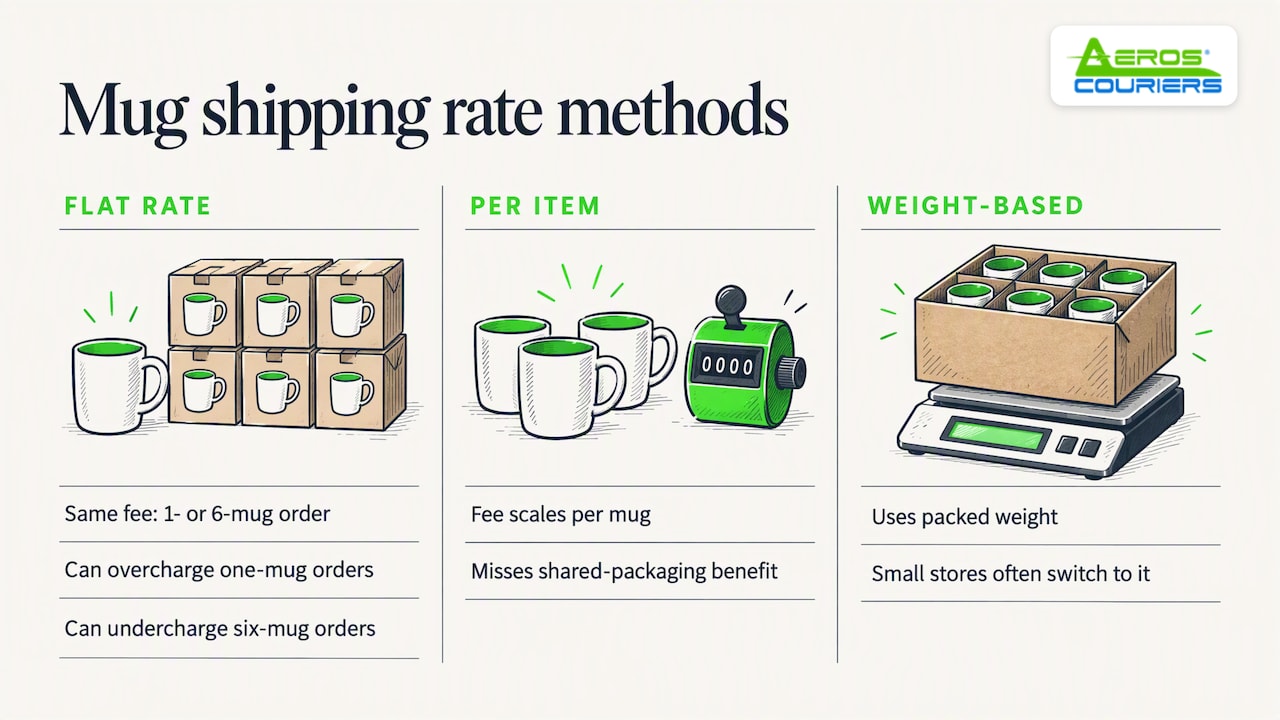
Say you sell ceramic mugs. Each mug packed weighs about 500g and you charge a flat rate per order. A customer orders one mug and pays the same as a customer ordering six. You’ve either overcharged the first or undercharged the second. Switching the rule to per item fixes some of that, but you lose the benefit of shared packaging. This is the point where most small stores move to weight-based rates.
Weight-based shipping
Weight-based shipping charges according to the total weight of the order and supports weight tiers. It doesn’t take dimensions or distance into account, and every physical product needs a weight entered or the rates won’t work (Squarespace Help Center).
A practical tier structure for a small Australian store might look like this:
| Order weight | What to charge |
|---|---|
| Up to 500g | Your lightest satchel cost plus packaging |
| 500g to 2kg | A small box rate |
| 2kg to 5kg | A medium box rate |
| 5kg to 25kg | A heavy rate priced for your most distant zone |
The figures are for you to work out from real quotes. Don’t copy a competitor’s checkout price. Weigh the product with its packaging, add a margin for tape and filler, and price the tier against the most expensive likely destination.
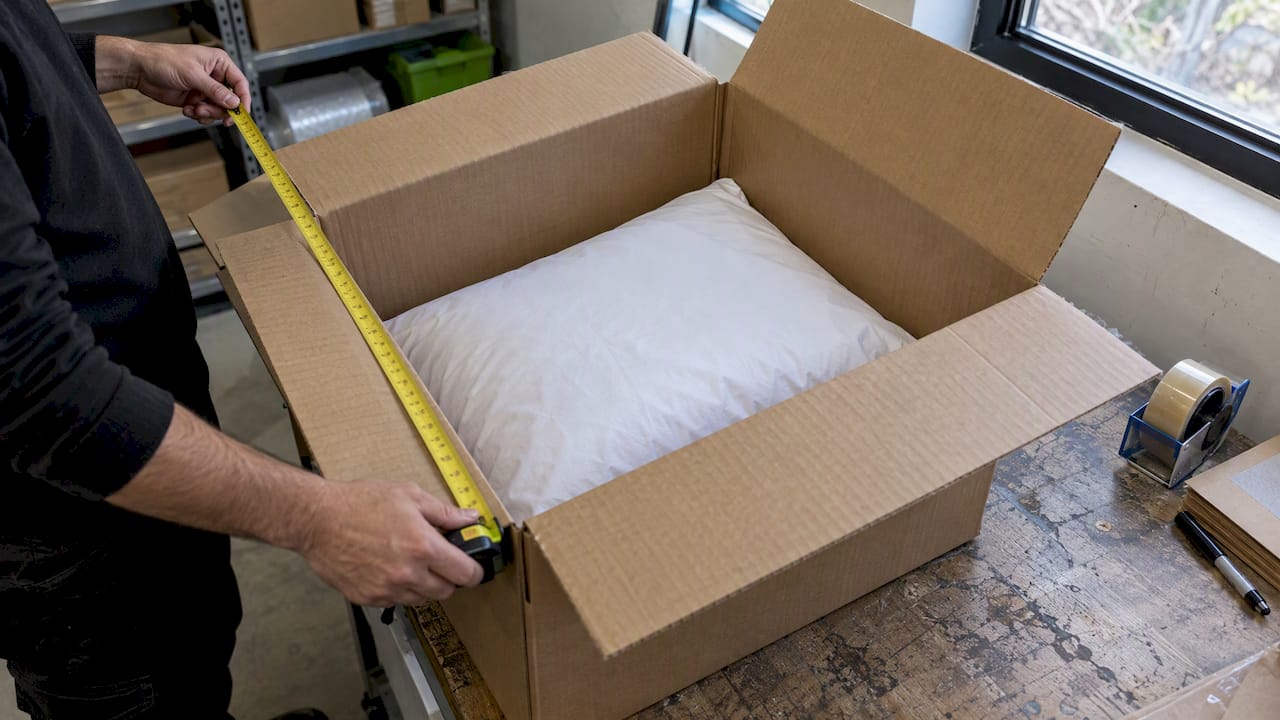
The weakness is the one Squarespace flags: no dimensions and no distance. A pillow weighs little and occupies a large box. Couriers charge for the space it fills (cubic weight), so a light but bulky item can cost far more to send than its scale weight suggests. If you sell anything bulky, check the cubic weight before you trust a weight tier.
Carrier-calculated shipping
This is the option that most closely matches what a courier would charge. Squarespace supports carrier-calculated rates for domestic Australian orders, based on package weight, dimensions and the delivery address. Australia is listed as supported on the Core, Plus, Advanced, Business and Commerce plans. Default rates use a pre-negotiated discount of up to 91%, and if you connect your own carrier account, the rates use your contract details and you can add an optional markup (Squarespace Help Center, updated 13 February 2026).
That “up to 91%” is a ceiling, not a typical outcome. Treat any discount claim as a maximum and test real parcels against the quotes you get elsewhere.
Carrier-calculated rates make most sense when:
- Your parcels vary a lot in size and weight
- You ship across states and want the rate to reflect distance
- You’d rather not maintain a rate table by hand
The catch is a mismatch between what the customer is charged and what you pay if you then book the parcel with a different courier. If the checkout rate is built from one carrier’s pricing and you ship with another, the gap is your profit or your loss. Check it on a handful of real orders each quarter.
Shipping zones: country, state, city and postcode
Australian sellers can create shipping zones by country, state, city and postcode, and each rule can hold up to 999 postcodes (Squarespace Help Center, updated 1 September 2026).
This is handy in a country this size. Some ways to use it:
- Metro and regional pricing. Set one rate for the capital cities and a higher one for regional and remote postcodes.
- Australia-only products. If an item can’t be sent overseas (food, fragile goods, restricted items), limit it to Australian zones. Squarespace sellers have asked about this for years, because it’s easy to miss.
- Interstate pricing. A Melbourne seller can price Victoria one way and Western Australia another.
Build the zone structure first, then attach rates. It’s far easier to review three or four zones than to untangle dozens of ad-hoc rules.
Local pickup and local delivery
If you have a studio, shop or stockroom, local pickup costs nothing to add and removes shipping from the order entirely. Local delivery can be free or paid. You set it up by entering the eligible Australian postcodes individually, a delivery name shown to customers, an optional fee and the delivery information you want customers to see (Squarespace Help Center).
This works well for florists, bakers, furniture makers and anyone with a dense local customer base. Keep the postcode list tight. A delivery area you can actually cover in an afternoon is better than a generous one you can’t.
Getting the parcel moving: the courier side
Once an order lands, you need to book a pickup or drop-off, print a label and give the customer tracking. Many small stores do this by hand, comparing carriers for each parcel. It works at five orders a week and becomes a chore at fifty.
This is where our parcel delivery service fits. You enter the parcel details, compare rates across major carriers, book door-to-door pickup, print the label and track the shipment from one place. Parcels go up to 25kg, rates start from $4.90, and there’s no fuel surcharge or handling fee added on top. If you want to see your own parcel priced, start at the shipment rate page.
There’s no subscription. You pay per shipment, which suits a store whose volume swings between a quiet January and a busy November.
For a clearer view of what to expect on the cost side, our guides on ecommerce shipping costs in Australia and how courier prices are built go through the line items that push a quote up.
How WooCommerce handles Australian shipping
If you’re weighing up platforms, or you’ve inherited a WooCommerce store, the model is different. WooCommerce’s extension for the national postal carrier pulls live rates from that carrier’s API when the store uses AUD and is based in Australia. You set the origin postcode, which services to offer, how rates are displayed and how parcels are packed (WooCommerce documentation).
The packing method matters. You can pack items individually, use the combined cart weight and split when necessary, or pack into predefined boxes with set weights and dimensions. The documentation recommends the box-packing method, and it’s the one that gives the most realistic quote if you ship in a few standard box sizes.
A second detail to check if you advertise on Google: WooCommerce’s Google integration can sync regional shipping by state or postcode in Australia, but dynamically calculated carrier-based rates aren’t currently supported by that extension (WooCommerce documentation). In practice you’d use fixed zone-based rates for anything you push to Google listings.
How BigCommerce handles Australian shipping
BigCommerce offers real-time quotes from the national postal carrier to merchants shipping from Australia. You need an Australian origin postcode, an Australian shipping zone, an API key and the services you want to offer. Quotes use the destination, package weight, value and dimensions (BigCommerce support).
For stores with several warehouses or suppliers, BigCommerce also supports a rate-management app that can vary rates by product, zone, customer group, shipping origin and box configuration (BigCommerce support). That’s more than most small sellers need, but it’s worth knowing it exists before you outgrow the built-in tools.
Squarespace, WooCommerce and BigCommerce side by side
| Squarespace | WooCommerce | BigCommerce | |
|---|---|---|---|
| Flat and weight-based rates | Yes | Yes | Yes |
| Live carrier rates for Australia | Built in, plan-dependent | Via carrier extension | Via carrier integration |
| Postcode-level zones | Yes, up to 999 postcodes per rule | Yes | Yes |
| Local pickup and delivery | Yes | Yes | Yes |
| Box-based packing | Not described in its help pages | Yes, recommended | Dimensions passed to quotes |
The differences that matter day to day are in setup effort, not capability. Squarespace is the quickest to get running. WooCommerce gives the most control over packing. BigCommerce sits in between and scales well with extra tools.
Dropshipping and shipping costs
Dropshipping changes who packs the parcel, not who is responsible to the customer. Under Australian Consumer Law, the seller still answers for what arrives and when, so your product pages should describe where stock ships from and how long delivery will realistically take. If a supplier is overseas, rates built for a domestic courier won’t reflect your real cost, and delivery estimates need to be longer.
Three habits keep dropshipped orders manageable in Squarespace:
- Use flat rates only where the supplier’s own charge is flat. Otherwise you’ll absorb the difference.
- State the dispatch origin and a delivery window on the product page rather than only at checkout.
- If you hold some stock yourself, use separate zones and rates for it so fast local orders aren’t priced like slow overseas ones.
For the Australian stock you do hold, book the outbound leg through a platform where you can see the price before you commit.
Our view: price shipping from the courier’s invoice, not from the checkout
We handle parcels for small and medium businesses every day, and the same pattern comes up. Sellers set their Squarespace rates once, from a quick look at a courier’s price list, and then never revisit them. A year later the rates are wrong in both directions. Some parcels are subsidised, others are overcharged, and the shop loses either money or conversions.
Our advice is practical:
- Price from real invoices. Take your last twenty parcels, their actual costs and their destinations. Build your tiers from that, not from a guess.
- Watch for add-ons. Fuel surcharges, handling and residential delivery fees can turn a cheap-looking quote into an expensive one. We don’t add them, so the quote you see is the price you pay.
- Compare before you book. Rates for the same parcel differ between carriers, and the cheapest isn’t always the right one. Sometimes a few dollars more buys next-day delivery that saves you a refund request.
- Make tracking part of the customer experience. Most “where is my order” emails disappear when the customer gets a tracking link on dispatch.
Shipping is one of the few costs a small store can shrink without lowering quality. Our rewards points can also reduce future booking costs, which helps when you ship regularly.
— Aeros
A simple setup checklist
- Weigh and measure every product in its packaging, and enter weights in Squarespace.
- Decide your method: flat rate for uniform products, weight-based for mixed ones, carrier-calculated for bulky or variable parcels.
- Create zones for the places you really ship to, and exclude the ones you don’t.
- Test checkout with three orders: a light local one, a heavy interstate one and a remote postcode.
- Compare each test rate against a real courier quote.
- Write a clear shipping policy with dispatch times and delivery windows.
- Review rates every quarter against your actual courier spend.
If speed is part of your offer, our pages on express courier service and next-day shipping explain what’s available and when it makes sense.
FAQ
Does Squarespace calculate shipping for Australian orders?
Yes. Carrier-calculated shipping is available for domestic Australian orders on the Core, Plus, Advanced, Business and Commerce plans. It uses package weight, dimensions and the delivery address. You can also use flat-rate or weight-based rates if you prefer fixed prices.
Can I charge different shipping to different states or postcodes?
Yes. You can create zones by country, state, city or postcode, and each rule holds up to 999 postcodes. Attach flat-rate or weight-based options to those regions to charge metro, regional and remote customers differently.
Can I change the shipping cost after a customer has checked out?
No. Squarespace adds shipping at checkout and doesn’t let you quote a custom amount afterwards. If an order is unusually heavy or bulky, you’d need to contact the customer and arrange a refund or a new order, so it’s worth setting rates that cover your worst case.
Do I need a courier account to use Squarespace shipping?
Not to set rates. Squarespace only decides what the customer pays at checkout. To send the parcel you still need a courier or booking platform. With Aeros you book each parcel as you go, with no subscription.
Sources
- Carrier calculated shipping, Squarespace Help Center
- Set up shipping rates for your products, Squarespace Help Center
- Set up shipping zones, Squarespace Help Center
- Choose shipping and delivery methods for your store, Squarespace Help Center
- Add local pickup and delivery to your online store, Squarespace Help Center
- How to Set Up Shipping for Your Online Business, Squarespace
- Australia Post documentation, WooCommerce
- Setup and configuration, Google for WooCommerce
- Australia Post shipping quotes, BigCommerce support
- ShipperHQ, BigCommerce support
Recommended
- Ecommerce Shipping Costs in Australia: Cut Freight Expenses
- Discover how to get the cheapest rate with satchels and parcels in Australia.
- Unlock the Best Post Rate Australia for Your Shipments
- Ecommerce Shipping in Australia: A Practical Guide for Online Sellers
Courier quotes, tracking and support
Ready to send a parcel? Compare the available services for your postcodes, parcel dimensions and weight. For an existing delivery, use your consignment number to check tracking or ask our team for help.