

Pack the laptop powered off (not sleeping) with the battery installed where permitted, double-box it with firm cushioning, declare battery details for any air shipment and buy tracking plus declared-value insurance. These steps follow CASA safety rules and are exactly what we ask for when you book through Aeros, because they’re what actually stops a laptop from breaking or vanishing in transit.
TL;DR:
- Packing with at least 5 centimeters of cushioning and double-boxing is key to protecting laptops during transit, regardless of courier choice.
- Lithium batteries under 100 watt-hours generally qualify for passenger flights but must be declared and protected against activation and damage.
- Shipping spare batteries requires stricter compliance and often separate handling or routing restrictions, especially for cargo flights or dangerous goods regulations.
- Accurately measuring, weighing, and labeling the packed box, along with photographing and keeping supporting documents, are essential for claim protection.
- International shipments involve additional customs paperwork, duty, and tax considerations, which can increase transit times and handling complexity.
Table of Contents
- Step-by-step packing and double-boxing method
- Lithium batteries and dangerous-goods rules you need to know
- Measuring, weighing, labelling and paperwork before collection
- Choosing a courier service, insurance and tracking options
- International shipping: customs, duties and cross-border limits
- Pre-collection and delivery checklist to protect your claim
- Aeros: carrier notes and how our platform helps with laptop shipments
- Estimating total shipping costs including customs duties and taxes
- Average shipping times and transit timelines for common destinations
- What actually protects your laptop and your data
- Book your laptop shipment with Aeros
- FAQ
- Sources
Step-by-step packing and double-boxing method
Getting the packing right matters more than the courier you pick. Follow this order:
- Shut the laptop down completely rather than putting it to sleep or into hibernation, then remove it from its sleeve or dock.
- Disconnect and remove accessories such as chargers, cables and external drives, and back up any important files before you pack.
- Photograph the serial number and the overall condition from several angles. These photos are your evidence if a claim comes up later.
- Use the original manufacturer box if you still have it. If not, choose a rigid inner box sized close to the laptop and a larger, sturdy outer box, leaving at least 5 centimetres of clearance on every side for double-boxing.
- Wrap the laptop in anti-static bubble wrap or foam, add corner supports to protect the hinges and corners, and fill any remaining gaps with foam or crumpled kraft paper so nothing can shift.
- Seal the charger in its own bag and place it beside the laptop rather than resting against the screen.
- Tape every seam using the H-taping method, across the centre and both edges of each flap.
- Slip a copy of the sender’s and recipient’s details inside the box as a backup to the external label.
A few extra habits help:
- Never rely on a single layer of bubble wrap as your only protection.
- Keep the laptop centred in the box so cushioning absorbs impact evenly on all sides.
Lithium batteries and dangerous-goods rules you need to know
Most laptop batteries sit below 100 watt-hours, which generally keeps them within limits for passenger aircraft, but they still need to be declared where the courier or airline requires it. CASA’s guidance requires any device with a lithium battery to be switched off completely, not left in sleep mode, and protected against accidental activation or damage.
Spare batteries face tighter restrictions than batteries installed in a device. A battery inside the laptop, one packed alongside the laptop and a spare battery travelling on its own are treated differently under air cargo battery guidance, with spares often facing the strictest limits and sometimes needing to travel separately from checked cargo.
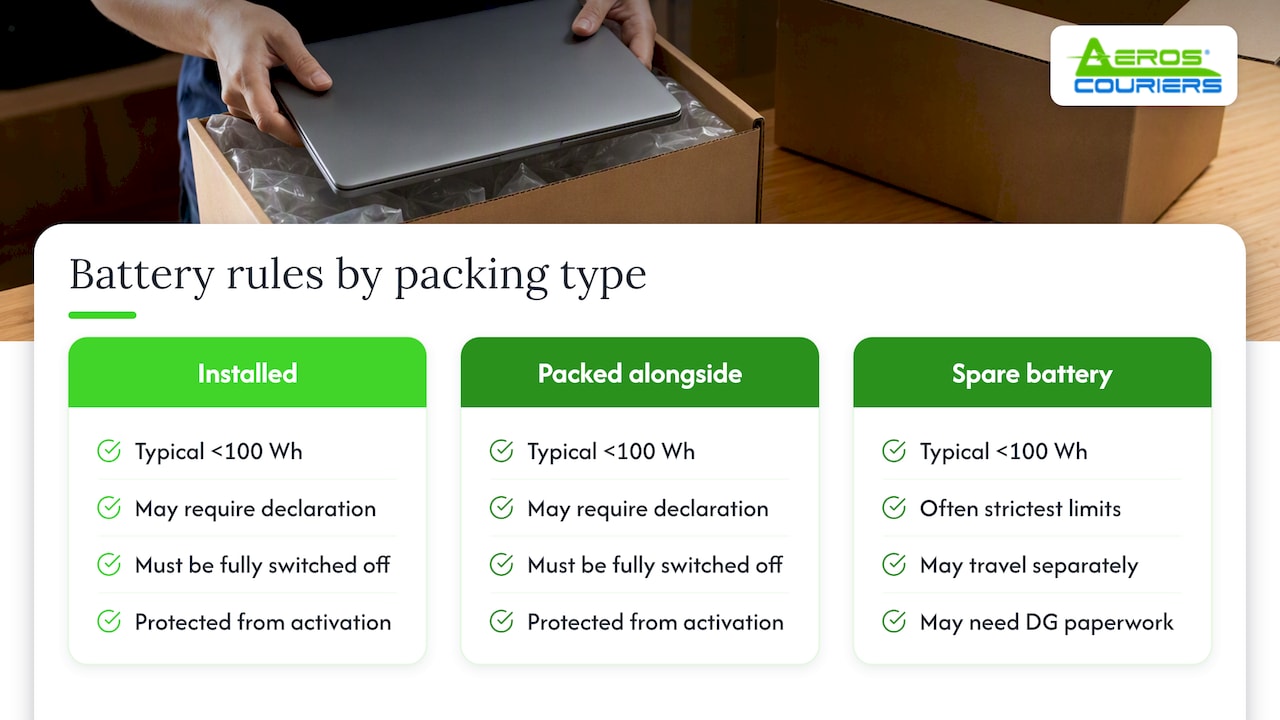
If a shipment is classed as cargo aircraft only or needs dangerous goods paperwork, expect fewer flight options and possible delays.
Pro Tip: Check the battery for swelling, cracks or leaks before you pack it. A damaged battery should never be shipped by air.
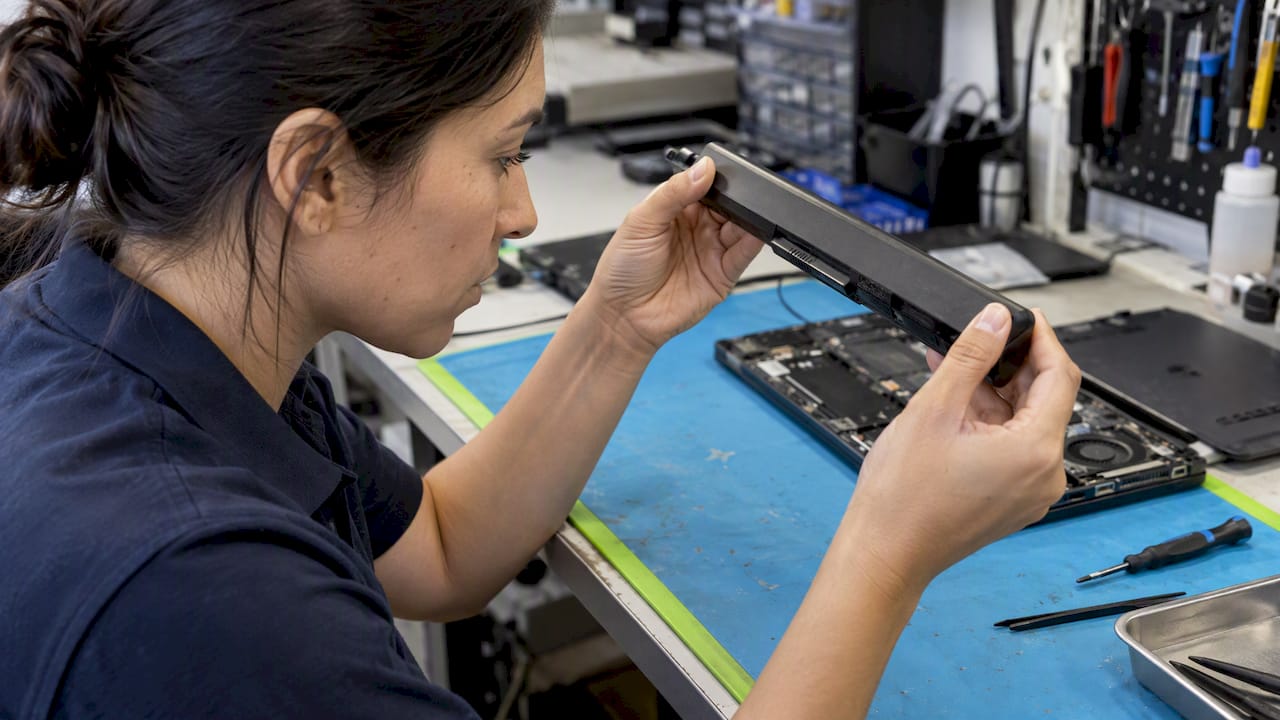
Complete any carrier battery declaration form honestly and never conceal a spare battery inside clothing or padding.
Measuring, weighing, labelling and paperwork before collection
Courier quotes and customs manifests are both based on the packed carton, not the laptop alone, so measure length, width and height once everything is sealed, then weigh the full box including packaging.
- Write a clear, specific contents description such as “laptop with lithium-ion battery, installed” rather than a vague “electronics” label, so handlers can identify it correctly.
- Record an accurate declared value: understating it can limit what you can claim if something goes wrong.
- Photograph the packed carton alongside the unpacked device, and keep your tracking number, drop-off or collection receipt and booking confirmation screenshot together.
- For a personal laptop sent internationally, a simple pro forma invoice stating it’s a personal item with an honest value is usually enough. A commercial invoice is only needed for business shipments or resale goods.
Choosing a courier service, insurance and tracking options
Match the service level to how much risk you can tolerate and how soon the laptop needs to arrive.
- Standard service suits laptops that aren’t urgent and can absorb a day or two of extra handling.
- Express and same-day options reduce the number of times the parcel changes hands, which lowers handling risk for a fragile item.
- Declared value cover ties your payout to the value you stated at booking, while third-party insurance may ask for an independent valuation or original receipt before paying a claim.
- Signature-on-delivery and detailed tracking reduce disputes over whether a parcel was actually delivered and to whom.
Pro Tip: If the laptop is worth replacing outright, pay the small extra for signature-on-delivery. It’s cheap insurance against a parcel left on a doorstep.
Quoted prices move with size, weight, speed and any add-ons like signature confirmation or higher declared value, so a lightweight express booking can still cost less than a slow, oversized standard one.
International shipping: customs, duties and cross-border limits
Sending a laptop across a border adds a layer of paperwork on top of the packing and battery rules.
- Fill in customs declarations accurately, and attach an invoice or proof of value if the destination country asks for one.
- A damaged battery, an unusually high declared value or a battery that needs a state-of-charge declaration can push a shipment onto cargo-only routing, which usually means more paperwork and a longer path. Consignments carrying dangerous goods may also need a Shipper’s Declaration for Dangerous Goods under the regulatory framework CASA applies in Australia.
- Duties and taxes may be charged to the recipient on arrival, so let them know that’s a possibility before the parcel turns up.
- For a high-value laptop or a shipment with complicated paperwork, a freight forwarder or customs broker can handle the declarations and reduce the chance of the parcel being held up. This shipping documentation checklist is a useful reference for what exporters and importers typically need to have ready.
Pre-collection and delivery checklist to protect your claim
- Photograph the device, its serial number and the sealed box from multiple angles, and make sure the photos carry a timestamp.
- Note the final packed dimensions and weight, and keep the booking confirmation and collection receipt together.
- At delivery, inspect the box before you sign for it.
- If there’s visible damage, either refuse the delivery or sign as “damaged” and photograph it immediately.
- Keep every invoice, receipt and message exchanged with the courier in one place in case you need to lodge a claim.
Aeros: carrier notes and how our platform helps with laptop shipments
We price parcels up to 25 kilograms with transparent pricing and no hidden fuel surcharges or handling fees, so a laptop shipment’s final cost matches the quote you see upfront.
- Enter the packed weight, battery details and declared value directly into our booking tools when you compare rates.
- Add insurance and signature-on-delivery as extras at checkout.
- Track the parcel in real time once it’s picked up, and earn reward points on the booking.
Our rates for parcels up to 25 kilograms cover most laptop shipments well within that weight range.
Estimating total shipping costs including customs duties and taxes
A domestic laptop shipment’s cost comes down to packed weight, dimensions, chosen speed and any add-ons like insurance or signature confirmation. International shipments carry extra variables: the destination country’s duty threshold, its tax rate on imported electronics and whether the battery triggers cargo-only routing with its own handling fee.
Duties and taxes are set by the destination country, not the courier, and are usually calculated on the declared value plus freight cost. A low-value personal laptop sent as a gift or personal effect sometimes falls under a duty-free threshold, but that threshold and the paperwork required to claim it vary by country, so check the destination’s customs website or ask a broker before you ship.
Build a buffer into your budget for the recipient, since duties are typically collected on delivery rather than at the time of booking. For a same-day or express domestic booking, the quoted price at checkout is the full cost, which makes comparing rates before you book the simplest way to avoid surprises.
Average shipping times and transit timelines for common destinations
Domestic transit times depend heavily on the service level you choose. A same-day booking within the same metro area can have the laptop delivered within hours of pickup, while standard interstate deliveries typically take a few business days depending on distance and how many depots the parcel passes through.
Express services sit between the two, trading a slightly higher price for fewer handling points and a tighter delivery window.
International timelines stretch further and depend on the battery classification as much as the distance. A shipment cleared for standard passenger aircraft can travel in days, while one pushed onto cargo-only routing or requiring additional dangerous goods paperwork often takes longer because of fewer available flights and extra customs checks at the border. Booking early and confirming the service level in advance helps avoid the laptop sitting in a queue during a peak period.
What actually protects your laptop and your data
The two habits that matter most are backing up your data before you pack and photographing the laptop’s condition right before you seal the box. Everything else, from the right tape to the right courier, is damage control if something still goes wrong. Keep a one-page checklist you reuse every time you ship, and don’t chase the fastest service at the expense of proper insurance.
— Aeros
Book your laptop shipment with Aeros
Compare rates, pick a service level, then add declared value and battery details before you schedule pickup or drop-off. Our pricing stays transparent from quote to delivery, with no fuel surcharge or hidden handling fee added afterwards, and tracking runs from collection through to signature.

Head to our compare and book courier page to get a rate for your laptop shipment and lock in pickup.
FAQ
What is the cheapest way to ship a laptop?
The cheapest option is usually a standard domestic service rather than express or same-day, since speed is the main driver of cost. Keeping the packed box as light and compact as possible while still protecting the laptop also helps, since couriers price on packed weight and dimensions.
Can I send my laptop via Australia Post?
Australia Post and most couriers can carry laptops, but any lithium battery still needs to meet the same power-off, damage-free and declaration requirements that apply across the industry. Check the specific carrier’s lithium battery policy before booking, since rules on spare batteries and declarations can differ between providers.
Can I send a laptop overseas?
Yes, but international shipments need accurate customs declarations, proof of value and compliance with battery rules that can affect routing. A battery needing a state-of-charge declaration or cargo-only routing under CASA’s regulatory framework can add time and paperwork, so build that into your timeline.
How do I pack a laptop for a courier?
Power the laptop down completely, double-box it with at least 5 centimetres of cushioning clearance around the inner box and seal every seam with H-taping. Keep the charger in a separate sealed bag and photograph the device and serial number before you close the box.
Sources
- Lithium batteries | Civil Aviation Safety Authority
- Information for cargo consignors: Transport of lithium batteries by air – Australian Antarctic Program
