
Parcel status meanings are the tracking labels carriers use to show where a shipment sits in its journey, and almost every one of them fits a simple rule: Wait, Act, or Verify. Most updates (Label Created, In Transit, Arrived at Facility) mean wait. A handful (Delivery Exception, Available for Pickup) mean act now. Delivered means verify before you assume anything’s wrong. We’ve mapped the main statuses below using definitions from Australia Post’s developer documentation and courier tracking glossaries.
TL;DR:
- Most tracking statuses are routine and only require action when a delivery exception, attempted delivery, or pickup becomes apparent.
- Gaps of one or more days between scans during “in transit” statuses are normal and indicate ongoing movement, not delays.
- Extended periods with “label created” or no scans should prompt contacting the sender or carrier, depending on the situation.
- Collect a full set of proof, including tracking info, photos, and ID, before escalating issues to speed up investigations.
- Clear communication to buyers about next steps and expected updates helps reduce support queries and shipping anxiety.
Table of Contents
- A five-stage framework for reading any carrier’s status
- Common statuses decoded: what they mean and what to do next
- When to escalate and what to have ready before you call
- A quick checklist for merchants watching buyer-facing statuses
- Why we built this guide around action, not anxiety
- Compare rates and track every shipment in one place
- FAQ
- Sources
A five-stage framework for reading any carrier’s status
Every carrier writes its own wording, which is part of the problem. One company’s “Info Received” is another’s “Label Created”, and a third calls it “Pre-Transit”. According to Ship24’s breakdown of tracking statuses, carriers write these labels for their own operational use, not for customer clarity, so the same phrase can describe different physical events depending on who issued it. The fix is to stop memorising vendor phrases and instead map whatever you see onto five stages that cover almost any shipment, domestic or international.
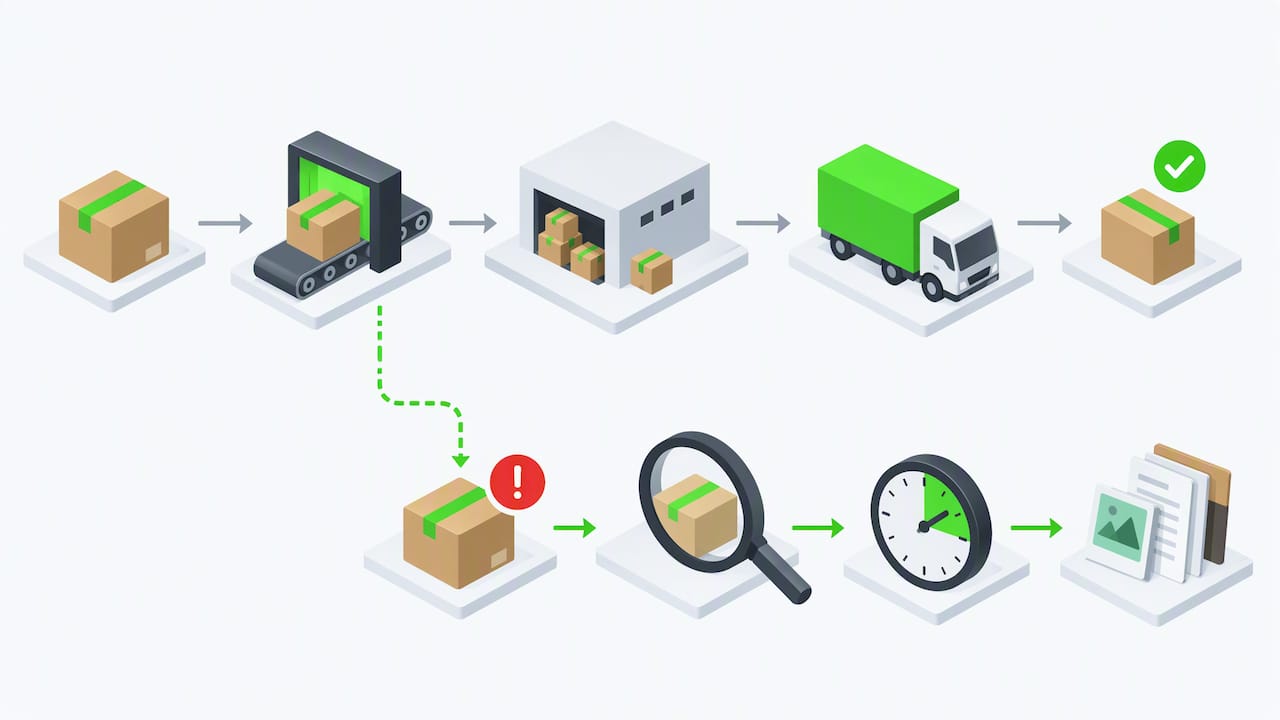
- Label created / pre-transit: the shipping label exists, but the parcel may not yet be in the carrier’s hands. Expect this to sit unchanged for up to a day or two while the sender prepares the parcel.
- Accepted / picked up: the carrier has physically taken possession. This is when the transit clock genuinely starts, not the label creation time.
- In transit: the parcel is moving between facilities or on a vehicle. Scan gaps of a day or more are completely normal on long road or air legs.
- Out for delivery: the parcel left the local depot on a vehicle for final delivery, usually that same day.
- Delivered / returned: the carrier recorded a successful drop-off, or the parcel is heading back to the sender because delivery couldn’t be completed.
The reason this matters is that merchants and recipients lose hours worrying about statuses that are doing exactly what they’re supposed to do. A parcel sitting in “In Transit” on a long route isn’t stuck. It’s travelling. Knowing which of the five stages you’re actually looking at, regardless of the exact words on screen, is most of the battle.
Common statuses decoded: what they mean and what to do next
Here’s what the most frequently seen labels actually mean and the exact next step for each, drawn from TrackingAdvice’s status decoder and its companion status meanings guide.
- Label created: the shipping label is generated but the carrier likely hasn’t scanned the parcel in yet. Wait 24 to 72 hours; if nothing changes after several business days, contact the seller.
- In transit: the parcel is moving through the network. Gaps of around a day or more between scans are typical depending on the lane; no action needed.
- Arrived at / departed facility: confirms forward progress. Paired “arrived then departed” scans at the same sorting facility are a good sign the parcel is on schedule.
- Out for delivery: a courier has the parcel on a vehicle for same-day drop-off. Be reachable, add delivery instructions, or authorise a safe place if the carrier allows it.
- Delivered: the carrier logged a successful delivery. Check the front door, side gates, and with neighbours before assuming it’s missing, and give it 24 hours before escalating.
- Delivery attempted / delivery exception: this needs immediate attention. Check the door tag for redelivery instructions or contact the carrier directly to reschedule.
- Available for pickup: the parcel is being held at a depot or post office. Collect it with photo ID inside the holding window, or arrange redelivery before it’s returned.
- Customs / clearance: a normal part of international shipping that typically takes one to ten business days. Only act if the carrier specifically requests documents or a duty payment.
- Return to sender: the carrier couldn’t deliver and is sending the parcel back. Contact the sender straight away to arrange a reship or refund.
- Tracking not updating: if a status hasn’t moved in several days, it’s time to start asking questions rather than keep waiting.
Only a handful of statuses genuinely require you to act fast. According to TrackingAdvice’s guide to status meanings, Delivery Exception, Delivery Attempted (door tag present), and Available for Pickup are the main ones; everything else is informational and simply needs patience.
When to escalate and what to have ready before you call
Most delays resolve themselves, but a few clear timelines tell you when it’s genuinely time to chase someone up. If a label has shown “Label Created” for an extended period with no acceptance scan, that’s usually a warehouse or fulfilment issue, not a carrier problem, and it’s worth contacting the sender directly. If a parcel has been “In Transit” with zero scans for several business days, it’s reasonable to escalate to the carrier.
Before you contact anyone, gather:
- Your tracking number and order or label proof.
- Photos of the packaging and address label, if you have them.
- Photo ID, if you’re arranging a pickup from a depot.
- Any door tag reference number left by the driver.
Pro Tip: Call the local depot handling your parcel rather than a general hotline. Depot staff can usually see scan history a national call centre can’t.
Claims windows vary by carrier, so ask directly when an investigation is opened whether there’s a deadline to file a formal claim. This preparation step, recommended in TrackingAdvice’s escalation checklist, speeds up most investigations considerably.
A quick checklist for merchants watching buyer-facing statuses
Buyer anxiety about tracking almost always comes down to vague communication, not the actual delay. A few habits cut down on support tickets fast.
- Confirm the carrier’s acceptance scan before quoting a delivery date, since Australia Post’s own guidance treats this scan, not the label creation time, as the real dispatch point.
- Check customs data and declared value on international shipments before they leave your warehouse.
- Tell buyers the exact next expected update and roughly when to expect it, rather than leaving them to guess.
- Decide upfront whether you’ll reship immediately on a lost-parcel claim or wait for the carrier’s investigation to close first.
Why we built this guide around action, not anxiety
Most of the stress around tracking comes from treating every status change as news, when most of them are just routine network movement. We put this guide together because our own monitoring tools show the same pattern daily: parcels that look “stuck” in transit almost always resolve on their own, while a small number of genuine exceptions need a phone call fast. Better route optimisation and active parcel monitoring catch exceptions earlier, reducing returned parcels and confusion. If a shipment looks wrong, reach out to support rather than guessing.
— Aeros
Compare rates and track every shipment in one place
We built our platform around the same idea behind this guide: clear information beats guesswork. Our shipment rate page shows transparent, flat-rate pricing before you book, with no fuel surcharges or handling fees added later, and active parcel monitoring flags delivery exceptions early so you’re not left reading vague statuses.
Compare carriers and book a courier in minutes, or check our parcel delivery service for the full range of options if you’re shipping regularly.
FAQ
What does “in transit” mean for my parcel?
“In Transit” means the parcel is actively moving through the carrier’s network between facilities or on a vehicle. Gaps of a day or more between scans are normal on longer routes, so it rarely needs any action on your part.
What’s the difference between “in transit” and “out for delivery”?
“In Transit” covers the whole journey between pickup and the final depot, while “Out for Delivery” means a courier has the parcel on a vehicle for drop-off, usually that same day. Out for Delivery is the point to make sure you’re reachable or have delivery instructions in place.
What should I do if my parcel shows “delivered” but I don’t have it?
Check safe spots like the front porch, side gates, or a parcel locker, and ask neighbours before assuming it’s lost. Carriers often log “Delivered” slightly before the recipient physically has the parcel, so wait 24 hours and then contact the carrier if it still hasn’t turned up.
What does “delivery attempted” or “delivery exception” mean?
These are among the few statuses that need immediate attention. A door tag usually explains why delivery failed and how to arrange redelivery or pickup, so check it straight away rather than waiting.
How long does customs clearance usually take?
Customs or clearance processing typically takes one to ten business days for an international parcel and is a normal part of the journey. Only act if the carrier specifically asks you for documents or a duty payment.
Sources
- Tracking status decoder — TrackingAdvice
- APIs — Australia Post developers: reference statuses
- What every parcel tracking status actually means — Ship24
