A sales day is over, but the work isn't. Orders need to become correctly addressed boxes and satchels, postage needs checking, and every parcel needs a readable label that connects it to a tracking record. A tidy online workflow can make that routine quick and controlled, without turning dispatch into a morning of opening files one by one.
For Australian sellers, label printing online is the bridge between a low-cost checkout, fast parcel preparation and dependable tracking. This guide covers local and Australia-wide box and satchel deliveries, not pallets or specialised freight. The aim is simple: prepare each parcel accurately, book the right service, print a clear label and hand over a shipment that the carrier can process.
Why Online Shipping Labels Matter
A small Australian retailer finishes packing a day's orders. One carton is going to a nearby suburb, a satchel is heading to a regional address, and several more parcels need to travel across the country. If the seller copies each address into a separate document, downloads files into an unlabelled folder and guesses which tracking number belongs to which order, small mistakes can quickly slow dispatch.
An online label workflow keeps the handoffs connected. The sales platform or order list provides the recipient details. The courier booking records the sender, destination, parcel information and selected service. The system generates a label PDF, which is printed and attached to the parcel. Once the carrier accepts the shipment, the consignment and its tracking record allow the seller to follow its progress and share updates with the customer.
That connection matters in a large online market. The Australian Bureau of Statistics reported seasonally adjusted online retail sales of A$4,411.2 million in December 2024, up 4.2%, or A$178.1 million, from November (ABS retail trade data). Australia Post also reported that Australian households spent more than A$69 billion online during 2024, with 9.8 million households shopping online (Australia Post's 2024 eCommerce Report). For sellers, online orders mean fulfilment events, and fulfilment depends on labels that route parcels correctly.
The label is more than a printed address. It gives the carrier readable routing information and a barcode that supports scanning and tracking. Structured addresses help reduce transcription errors, while a clear print helps the parcel move through handling without avoidable confusion. Printing fits at the end of booking, but good label control starts with accurate order data.
Prepare Your Parcel and Addresses
Measure and weigh the packed parcel, not the empty box or the product alone. Packing material changes the final dimensions and weight, and those details can affect the postage quoted at checkout.
For a local box, measure its length, width and height after sealing. Weigh it on a suitable scale, then check that the booking details match what you'll hand to the carrier. A compact parcel can still have a higher billable weight than its scale weight suggests: for non-flat-rate packaging, Australia Post uses whichever is greater, actual weight or cubic weight, with cubic weight calculated by multiplying parcel volume in cubic metres by 250 (Australia Post size and weight guidelines). Choosing a box that fits the item closely can help keep the chargeable size under control.
For standard Australia Post parcel deliveries, the published domestic boundaries are up to 22 kg, a maximum length of 105 cm and a maximum volume of 0.25 cubic metres (Australia Post size and weight guidelines). Check the selected carrier's own conditions before booking. If a parcel is outside the ordinary range, don't force it into a standard label workflow. Find an appropriate shipping arrangement rather than relying on a label that doesn't match the parcel.
Confirm whether the destination is residential or commercial and check the recipient's name, street details, suburb, state and postcode. For address formatting, use this Australian address format guide. Keep each order's items and reference number together before entering shipment details, especially when several parcels are being prepared at once.
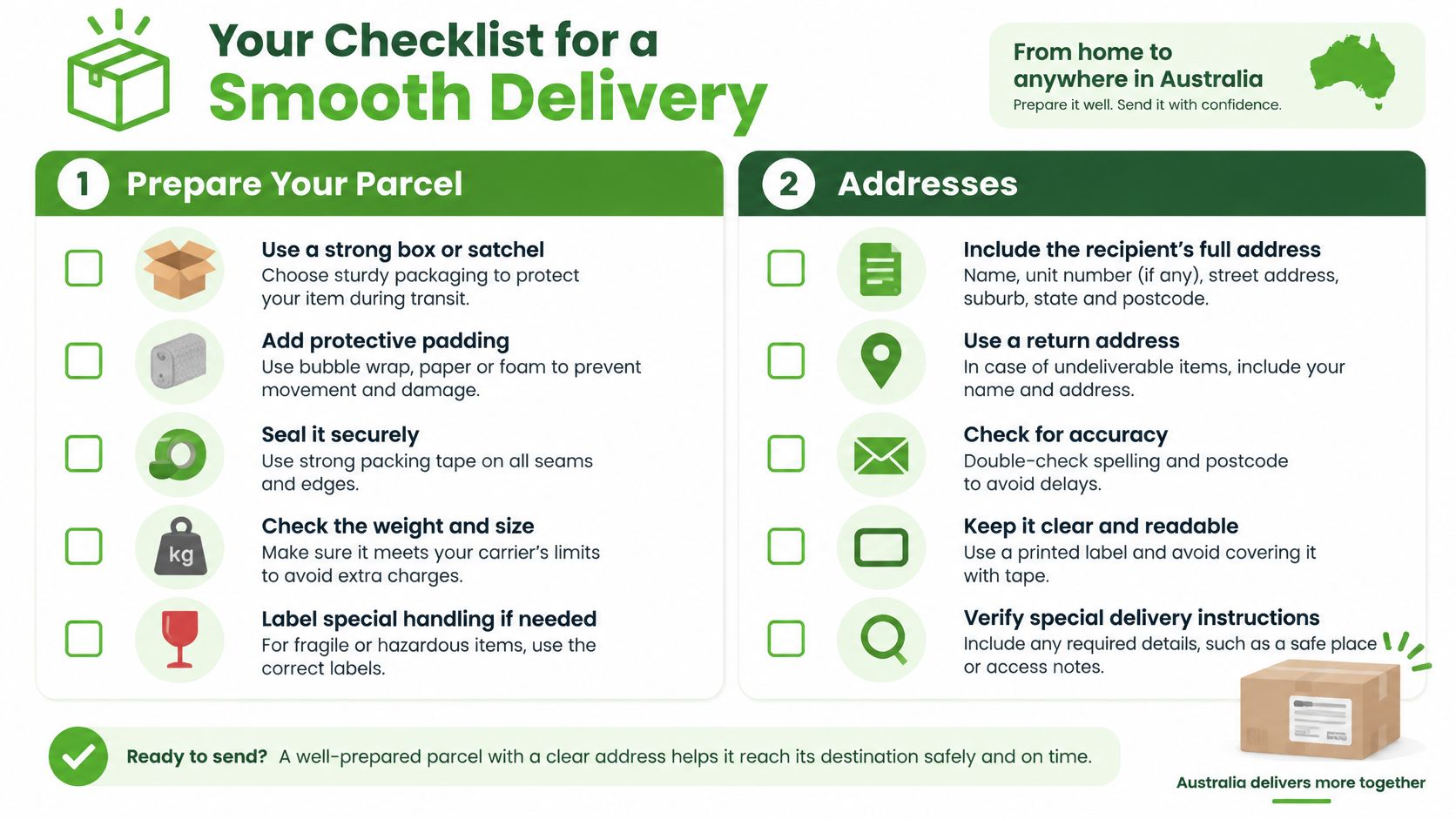
Before opening the courier dashboard, check the destination, parcel type, measurements, weight, packaging condition and expected service speed. That quick pre-entry routine helps avoid correcting a booking after the label is already printed.
Choose Thermal or Laser Printing
The right printer depends on how often you dispatch and what equipment you already have. A dedicated thermal printer suits sellers who prepare many parcels and want a direct path from a courier PDF to a label. A laser printer can be a sensible starting point for occasional shipments or an office that already prints documents and has compatible label stock.
| Consideration | Thermal printer | Laser printer |
|---|---|---|
| Setup | A dedicated device and compatible label stock are needed. | Can use an existing office setup, with stock suited to the printer. |
| Dispatch volume | A practical fit when labels are part of a frequent packing routine. | Often adequate when only a small number of labels are needed. |
| Label output | Print quality depends on the printer, settings and label stock. | Output depends on printer settings and stock compatibility. |
| Best fit | Sellers who want a separate, label-focused workflow. | Occasional senders who want to begin with equipment they already own. |
Neither option removes the need to check the printed result. A courier PDF can look correct on screen but print at the wrong scale, with weak contrast or in a mismatched format. Test the setup using the stock you intend to use. Check that the address and barcode are clear and that the label can be attached flat to the parcel.
Practical rule: Choose the printer around your dispatch routine, then confirm the stock and settings with a test print before relying on a batch.
If you're comparing label stock and printer supplies, this printer-labels selection resource can help you think through stock compatibility. For more detail on fitting a dedicated device into a parcel workflow, see shipping label printers.
Create and Download the Courier Label
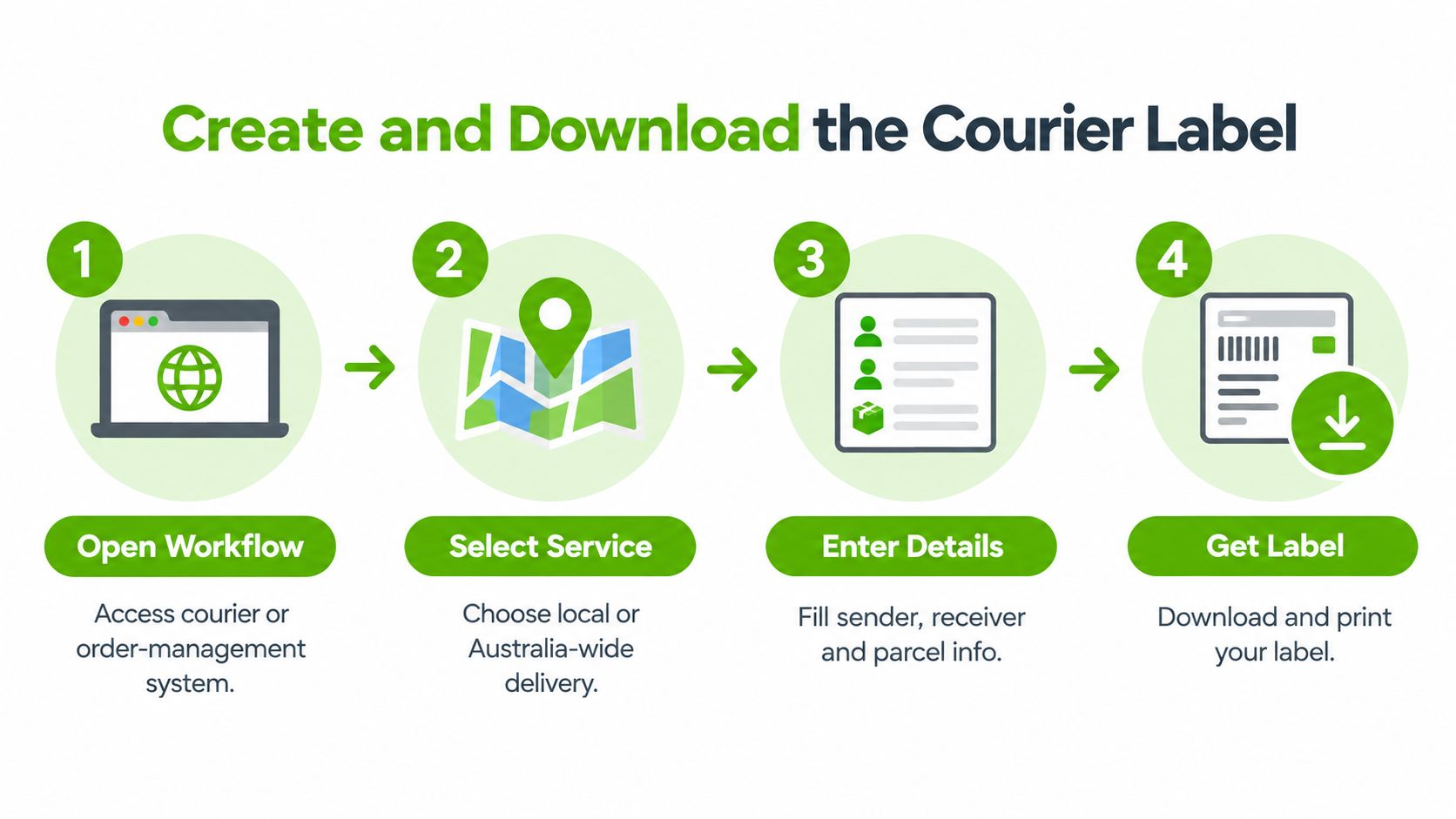
Open the courier or order-management dashboard once the packed parcel details and recipient address are ready. Choose the local or Australia-wide parcel service that fits the destination and delivery expectation, then review the quoted postage before confirming the booking. If you're comparing options, an online courier comparison and booking platform can help keep service selection and label creation in one workflow.
Enter sender and recipient details in their designated fields rather than pasting a full address into one line. Add the order reference where the system provides a reference field, and enter the parcel's packed weight and dimensions. Select the correct box or satchel format, check the destination and service, and confirm that the displayed postage reflects the shipment you've prepared.
Keep three identifiers distinct:
- Order number: identifies the customer's purchase in your sales system.
- Consignment number: identifies the shipment booked with the carrier.
- Tracking record: shows the shipment's progress as tracking events become available.
They may be linked in your dashboard, but they serve different purposes. Match the order to the consignment before printing so you can answer customer questions without searching through unrelated records.
Once the booking is confirmed, download the print-ready PDF and check that it belongs to the right parcel. Don't edit the carrier's layout, barcode or address blocks. Avoid cropping, resizing or rearranging the content to make it fit a different label format. If you need to review PDF dimensions or page setup, consult this PDF page size guide, then return to the carrier's original file for printing.
Save the file with a name that makes it easy to match to the physical shipment, such as the dispatch date, destination and consignment identifier. A clear naming habit is especially useful when several labels are downloaded close together.
Print and Check Real Shipping Labels
A retailer preparing a local box, a regional satchel and a batch of Australia-wide orders should check the physical label, not just the PDF preview. Before printing, select the correct label template or stock size. Set the print scale to 100% and turn off options such as “Fit to Page” if they change the carrier layout.
Inspect the printed sender and recipient details, postcode, barcode and routing information. Make sure nothing is cut off, faded or blurred. Then apply the label to the parcel in a flat, visible area. Don't cover the barcode with tape, folds or another label, and avoid placing it where the parcel's shape or texture makes it hard to scan.
Formal GS1 barcode verification is relevant to product and logistics labels where those standards apply. An ordinary parcel label doesn't automatically need that formal process. For most parcel dispatch, the practical test is whether the carrier information and barcode print clearly and stay unobstructed on the finished package.
A formed sample can reveal problems that a screen preview won't. Thermal printing, scaling settings, label stock and the way a label sits on a parcel can all affect the result. Print one sample using the intended printer and stock before producing the rest of a batch.
A correct file is only part of the job. The attached label must still be readable on the parcel that's going to the carrier.
If you're preparing many PDFs, this guide to printing PDFs in bulk may help organise the print process. For parcel positioning, refer to shipping label placement.
Real Parcel Workflows Across Australia
A local box, a regional satchel and a nationwide dispatch batch all follow the same basic logic, but each needs a few checks of its own.
Local box: A seller packs an item for delivery within a metro area, measures the sealed carton and weighs it. In the dashboard, they confirm the street address and postcode, choose a suitable local service and review the postage. Before handover, they check that the label lies flat and the barcode is clear.
Regional satchel: A packed satchel is weighed and its booking details are matched to the recipient's address. The seller reviews the available service and postage, then checks that the label is firmly attached and not folded across the barcode. A quick address review is useful here because a correct parcel can still be delayed by an incomplete destination.
Australia-wide batch: A small retailer groups orders before creating bookings, then checks each order reference against its parcel and consignment. The seller confirms dimensions and weight, reviews the service and quote for each destination, and prints only after checking the generated files. This helps catch a mismatched PDF before it ends up on the wrong carton.
Fast service doesn't mean a guaranteed arrival date. Australia Post lists Parcel Post as generally taking 2–6 business days, with indicative estimates of 2–4 business days within the same state and 3–6 business days interstate. Express Post is generally listed as 1–3 business days Australia-wide, with indicative estimates of 1–2+ business days within the same state and 1–3+ business days interstate. These estimates can vary by origin, destination and network congestion (Australia Post delivery information).
For the cheapest practical postage, compare services against the actual parcel details and the delivery expectation. Don't select a service on speed alone, and don't assume a light parcel will always be the least expensive if its packed dimensions increase billable weight.
Troubleshoot Labels and Track Parcels
When something looks wrong, pause before reprinting everything. Match the symptom to its likely cause, correct the affected setting or booking, then print and check a fresh label.
| Symptom | Likely cause | Practical fix |
|---|---|---|
| PDF prints too small or too large | Browser or printer scaling changed the layout. | Set printing to actual size or 100%, then check a test print. |
| Thermal output looks blurry | The print settings, stock or printer condition may not suit the job. | Review the printer setup and stock, then print another sample. |
| Wrong label shape or layout | The selected template doesn't match the label stock. | Confirm the stock format and choose the matching template. |
| Address is incomplete | A field was blank or details were entered in the wrong place. | Correct the booking data before printing a replacement label. |
| Barcode area is damaged or covered | The label is folded, scuffed or obscured by tape or packaging. | Print a clean label and attach it to a flat, unobstructed area. |
| Weight or dimensions don't match the parcel | The shipment was measured before packing or the wrong parcel was booked. | Reweigh and remeasure the sealed parcel, then update the booking if needed. |
| Tracking record doesn't match the parcel | The wrong consignment was attached to the order or label. | Compare the physical label and consignment details with the order record. |
Compact packaging can help control billable weight, but don't compromise the parcel's protection just to reduce its dimensions. Likewise, choosing a faster service doesn't turn an estimate into a promised arrival date. Explain the selected service clearly and share the correct tracking details with the receiver after you've matched the label to the physical parcel. Use direct courier tracking to follow a shipment once its tracking record is available.
Before dispatch, make one final pass: confirm the order and recipient, check the parcel's packed weight and dimensions, review the booked service, match the consignment to the label, and make sure the barcode is visible. That repeatable check catches common errors without turning every dispatch into a fresh investigation.
Get an instant quote, book local or Australia-wide parcel delivery, print a label and track the shipment through the Aeros Couriers dashboard. Compare practical postage options for your boxes and satchels, then build a dispatch routine that gets each parcel ready for carrier acceptance.
Courier quotes, tracking and support
Ready to send a parcel? Compare the available services for your postcodes, parcel dimensions and weight. For an existing delivery, use your consignment number to check tracking or ask our team for help.