

You’ve probably done this before. You send an important parcel, hand over the counter receipt, walk back to the car, then check the tracking number almost immediately. Or you’re waiting on a signed document, a customer return, or a small high-value order, and every hour without an update starts to feel longer than it should.
That tension is normal. Small business owners don’t just ship parcels. They ship promises. A parcel that arrives cleanly and on time keeps cash flow moving, protects customer trust, and saves you from the time drain of “just following up” emails.
Tracking registered post helps because it turns a vague wait into a visible process. You stop guessing and start reading the network properly. Once you know what the scans mean, where the gaps usually happen, and when to act, the whole system becomes far less stressful.
The Advantage of a Tracked Parcel
A tracked item gives you something every sender wants. Control.
That’s why Registered Post has held its place for so long in Australia. It isn’t a trendy shipping feature. It’s a proven service with a long operating history and a clear purpose, secure handling, proof of movement, and a delivery record you can rely on.
Australia Post’s Registered Post service began in 1909 and has processed billions of items over its history, with a 99.9% delivery success rate as of 2023 according to this shipment tracking overview. That matters because trust in tracking registered post didn’t appear overnight. It was built over generations of senders needing confidence that important items would arrive.
For a small business, that confidence changes how you work.
Instead of telling a customer, “It should be there soon,” you can say, “It’s been accepted into the network and is moving.” Instead of wondering whether a contract pack was lost, you can check the event trail and make a decision. If you need a broader view of parcel visibility across carriers, tools like direct courier tracking show how useful a central tracking workflow can be once your shipping volume grows.
Why tracking feels calming
The emotional lift is real, but the practical value is even better:
- You reduce uncertainty: A scan history gives you evidence, not assumptions.
- You answer customers faster: Most delivery questions can be handled before they become complaints.
- You know when to escalate: A quiet tracking page isn’t always a problem. Sometimes it’s normal network movement.
Practical rule: The tracking number isn’t just for checking delivery. It’s your operating tool for deciding when to wait, when to update the receiver, and when to lodge an enquiry.
That’s the shift. You stop behaving like a nervous sender and start thinking like a logistics manager.
Locating Your Golden Ticket The Tracking Number
If you can’t find the right code, you can’t track anything properly. In Australia Post language, you’re usually looking for the Article ID tied to the Registered Post item.
For many parcels, the format looks like EE123456789AU. The letters and numbers aren’t random from your point of view, but you don’t need to decode every character. What matters is using the full ID exactly as shown, with no spaces added and no digits dropped.

Where to find it
The location depends on how the parcel was lodged.
Post Office receipt
If you lodged the item over the counter, the tracking number is usually printed on the receipt. Look for the longest alphanumeric code associated with the article or consignment.Prepaid satchel or label sticker
Some Registered Post packaging includes a peel-off barcode label or a printed article identifier. Keep that stub. It’s often the easiest record to read later.Online booking or confirmation email
If the shipment was prepared through an online process, the code may appear in the booking confirmation or dispatch email.Sender records
If you’re the receiver, ask the sender for the exact number, not a screenshot cropped halfway through the barcode.
Common mistakes that cause failed searches
Most tracking failures aren’t network failures. They’re input errors.
- Wrong code copied: People often paste an order number instead of the tracking number.
- Missing last characters: The final letters matter.
- Using the receipt reference: A receipt can contain several numbers. Only one is the correct trackable ID.
- Reading from a blurry photo: Ask for typed text if the image is hard to read.
A clear tracking number saves more time than any customer service call ever will.
If you deal with more than one carrier, it helps to see how different consignment references are presented. A page like capital transport tracking is useful for comparing how carrier-specific identifiers are usually handled in practice.
Quick ID check before you search
Use this mini-checklist:
- Is it the full code?
- Does it look like an article ID rather than an invoice number?
- Did you copy it exactly as printed?
- Are you tracking the right item from the right date?
Get this step right and the rest of tracking registered post becomes much easier.
Using Online Tools to Follow Your Parcel
The fastest way to track registered post is through the official online tracking page or the mobile app. Both do the same core job. Enter the article ID, pull the latest scan events, and show the current movement status.
In the Australian postal system, parcels are scanned at multiple network points. For metro deliveries, the published ETA performance is stronger than regional routes. A cited benchmark notes 98.7% delivery success within published ETAs for metro areas and 92.4% for regional locations, which is why active tracking matters so much when you’re sending across Australia rather than just across town (digital tracking analysis).
The simplest way to check status
Use this routine:
- Enter the full article ID: Paste carefully. Don’t rely on memory.
- Read the latest event first: The newest scan tells you where to focus.
- Then read backward: Older scans explain how the parcel got there.
- Check for notification options: Alerts reduce the urge to refresh the page all day.
- Compare the delivery area: Metro and regional movement patterns differ.
If you manage several shipments at once, a consolidated dashboard can save time. A simple track form style workflow is often easier than bouncing between tabs and receipts.
Website versus app
The website is usually best when you’re at a desk and comparing multiple jobs.
The app is better when you’re moving, waiting on a driver handoff, or updating a customer from your phone. The best tool is the one you’ll use consistently.
A useful parallel is fleet visibility. If you’ve ever looked into how businesses use vehicle GPS trackers, the logic feels familiar. Better visibility doesn’t make a network perfect, but it makes decisions faster and more accurate.
What Your Registered Post Tracking Status Means
| Tracking Status | What It Means in Plain English |
|---|---|
| Received by Australia Post | The parcel has been accepted into the network. It exists in the system and has had its first meaningful scan. |
| Arrived at facility | The item has reached a sorting or processing site and is waiting for the next movement step. |
| Departed facility | It has been sorted and sent onward to another hub or delivery area. |
| In Transit | The parcel is moving through the network, or between visible scan points. This is often the broadest status. |
| Arrived at delivery facility | It has reached the local area that should handle final delivery. |
| Delivered | Final delivery has been recorded. For Registered Post, this usually aligns with completed handover procedures. |
How to read the page like an operator
A single status on its own doesn’t tell the whole story. The pattern does.
If scans are appearing in logical order, the parcel is usually flowing normally even if there’s no exciting update. Trouble signs are different. Repeated broad statuses, no location context, or a scan trail that stops unexpectedly for too long can justify closer checking.
Operator view: Don’t ask only “Where is it?” Ask “What was the last confirmed handoff, and what should normally happen after that?”
That question turns a passive tracking habit into a useful one.
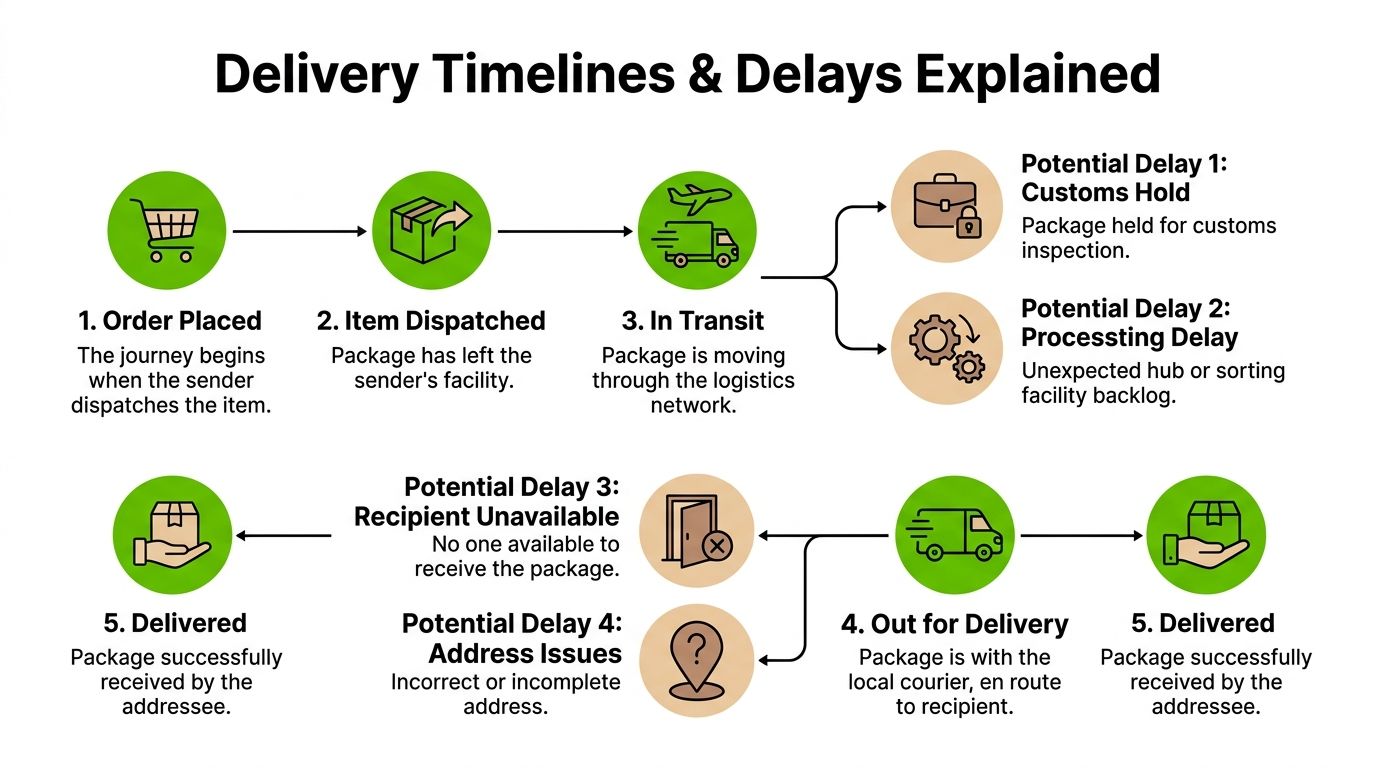
Understanding Delivery Timelines and Delays
Delivery timelines look straightforward on paper. In real operations, they’re full of handoffs, cut-off times, routing choices, and local conditions.
That’s why many people get frustrated with tracking registered post. They expect a parcel to behave like a rideshare map. It doesn’t. Postal tracking is event-based. You see milestone scans, not a live moving dot.
Metro routes behave differently
Metro-to-metro traffic usually produces cleaner tracking histories. There are more facilities, more regular linehaul movement, and more frequent scans.
Regional and remote routes are a different story. Australia Post data referenced in this discussion of regional tracking gaps notes that 28% of Australia’s population lives in regional or remote areas, and parcels to those areas average 3 fewer scan events than urban routes. The same source notes expected delays of 2 to 5 extra days may not always appear clearly in online estimates.
That single point explains a lot of “Why hasn’t it updated?” calls.
Why scan gaps happen
A quiet tracking page doesn’t always mean a lost parcel. Often it means the parcel is between high-visibility points.
Common reasons include:
- Long linehaul legs: The item may be moving a long distance without intermediate public scans.
- Local contractor handoff: Final-mile movement in smaller areas can be less visible.
- Manual handling points: Some routes produce fewer event updates.
- Low-frequency service windows: Certain regional movements don’t cycle as tightly as metro lanes.
A realistic way to judge delay risk
Use context, not panic.
If a metro parcel sits on the same broad status longer than you’d expect, that can be worth watching closely. If a regional parcel shows a normal acceptance scan and then goes quiet, that may still fit the route pattern.
Consider this practical approach:
| Route type | What usually matters most |
|---|---|
| Metro to metro | Fast processing, frequent scans, clear final-mile updates |
| Metro to regional | Strong early visibility, then possible silence before local delivery area updates |
| Regional to regional | Fewer scans overall, more dependence on transfer timing and local handling |
The biggest mistake senders make is applying metro expectations to regional freight. The parcel may be moving exactly as planned, but the tracking page won’t always tell the story in real time.
What doesn’t work
Two habits create unnecessary stress.
First, checking the page every hour won’t create a new scan. Second, assuming “In Transit” means something has gone wrong leads people to escalate too early.
A better approach is to match your expectation to the route. If the parcel is headed outside the main urban network, build in breathing room before you conclude there’s a problem.
Troubleshooting Common Tracking Scenarios
Most tracking problems fall into a small number of repeat scenarios. The key is to respond calmly and in the right order.

No update for several days
Start with the route type. If it’s regional, slower visible movement may still be normal.
Then check these basics:
- Confirm the last real scan: Was it acceptance, a facility arrival, or a departure event?
- Review the address: Wrong suburb, postcode, or business name can slow sortation.
- Ask whether the receiver missed a contact: Some receivers don’t notice attempted delivery messages.
- Check whether the item contains anything unusual: Extra review can affect movement.
If the parcel is business-critical and the silence is stretching beyond what feels normal, use a structured troubleshooting path such as Australia Post tracking not updating to gather the right details before contacting support.
It says delivered, but the receiver doesn’t have it
This one causes immediate stress, but don’t jump straight to “lost”.
Work through the simple possibilities first:
- Check whether someone else at the address signed or received it.
- Ask the receiver to inspect mailroom, reception, safe-drop areas, and side entrances.
- Verify the delivery address on the booking record.
- Look for timing issues, especially if the scan happened late in the day and the receiver checked too early.
For business addresses, reception teams often accept items without telling the intended person straight away.
The parcel seems to be going the wrong way
This happens more often than people expect.
A parcel may route through a major facility that doesn’t match your intuition. That doesn’t automatically mean misdirection. Logistics networks optimise around sorting capacity and trunk routes, not what looks shortest on a map.
Only worry if the sequence becomes illogical over multiple events or clearly shifts away from the destination area with no recovery.
The item is stuck on In Transit
This status is broad. It can represent ordinary network movement, waiting time between scans, or a hold that isn’t clearly labelled.
One area official FAQs often miss is compliance. Under Australia’s Chain of Responsibility laws, many non-compliant parcels face rejection or delays, and these can appear only as a generic “In Transit” status without much detail. That’s why some business senders get blindsided by a parcel that looks active but isn’t moving in a normal way.
When compliance may be the issue
This matters if you’re sending anything non-standard, restricted, or poorly declared.
Watch for these clues:
- You shipped something that may need declaration
- Packaging or labelling was improvised
- The contents could trigger inspection
- Movement stopped after acceptance with no clean onward pattern
If the parcel contents, packaging, or declarations are even slightly questionable, treat a vague delay as a compliance check until proven otherwise.
For small businesses, disciplined dispatch habits are important. Clear labels, accurate item descriptions, and using the right service for the right goods prevent most avoidable tracking dramas.
How to Lodge an Official Enquiry for Your Item
Sometimes you’ve done all the sensible checks and the parcel still isn’t moving, or the tracking story no longer makes sense. That’s the point to stop guessing and lodge an official enquiry.
An enquiry works best when it’s clean and complete. Don’t submit a vague message saying the parcel is “missing”. Give the support team enough information to identify the item, review the movement trail, and compare the scan history with delivery records.
Gather your file first
Before you contact support, pull together:
- The tracking number
- Sender and receiver names
- Full delivery address
- Lodgement date
- Description of contents
- Any photos of packaging or labels if you have them
- A short timeline of what you’ve already checked
That last point matters. A good enquiry reads like an incident summary, not a frustrated rant.
What to say
Keep it factual.
A strong message looks like this in plain language: the item was lodged on a certain date, the last visible scan was at a certain point, the destination is a certain suburb, and the receiver has checked for delivery or collection. Then ask for investigation of the current status.
That gives the case handler something useful to work with straight away.
When to escalate
Lodge an enquiry when:
- The scan history has stalled beyond what the route would normally suggest
- A delivery scan conflicts with what happened on site
- The parcel appears trapped in an unresolved status
- You suspect an address, handling, or compliance issue that self-service can’t clarify
The faster you submit a clear, evidence-based enquiry, the easier it is for support staff to follow the parcel trail while the details are still fresh in the system.
For business senders, this is also where service model matters. Large postal networks are built for scale, which can make support feel slower and more procedural. Dedicated courier platforms often suit urgent business shipping better because local support teams can resolve edge cases with less back-and-forth. If you send regularly, that difference becomes operational, not just convenient.
Proactive Tips for Flawless Shipping Every Time
The smoothest parcel is the one that never needs troubleshooting.
Tracking registered post works best when the sender does the basics well before lodgement. Most delivery friction starts long before the parcel enters the network.
Habits that prevent headaches
- Print clean labels: Smudged or badly placed labels create avoidable scan issues. If you want a stronger dispatch process, learn from practical label workflows like shipping labels printing.
- Use complete addressing: Include business names, unit numbers, contact details, and anything a driver or postal worker needs to identify the site quickly.
- Pack for handling, not appearance: Strong cartons and secure satchels beat attractive but flimsy packaging every time.
- Match the service to the parcel: Registered Post is useful for secure local Australian parcels, but not every item belongs in the same service stream.
- Keep sender records organised: Save receipts, confirmation emails, and photos until delivery is confirmed.
The receiver has a job too
Receivers can make delivery easier by monitoring alerts, checking shared reception areas, and making sure someone knows an important parcel is coming.
That’s how good shipping operations work. The sender prepares properly, the receiver stays reachable, and the tracking record becomes a tool instead of a source of stress.
Shipping doesn’t have to feel uncertain. Once you understand the rhythm of the network, you can send across Australia with a lot more confidence.
Aeros Couriers gives Australian businesses and households a simpler way to send boxes and parcels nationwide without the usual friction. You can get fast quotes, book online in minutes, print labels, track shipments from one dashboard, and access responsive local support when something needs attention. If you want a low-cost, practical shipping option for Australia-wide deliveries, visit Aeros Couriers.
Courier quotes, tracking and support
Ready to send a parcel? Compare the available services for your postcodes, parcel dimensions and weight. For an existing delivery, use your consignment number to check tracking or ask our team for help.